How to use the feedback button
Every page in Cheaploy has a feedback button in the bottom-right corner. It reports the exact page you are on, so you never have to explain where the problem was.
Where to find it
Look for the floating Feedback button pinned to the bottom-right of every page — landing pages, guides, your dashboard and project screens included.

What the form asks for
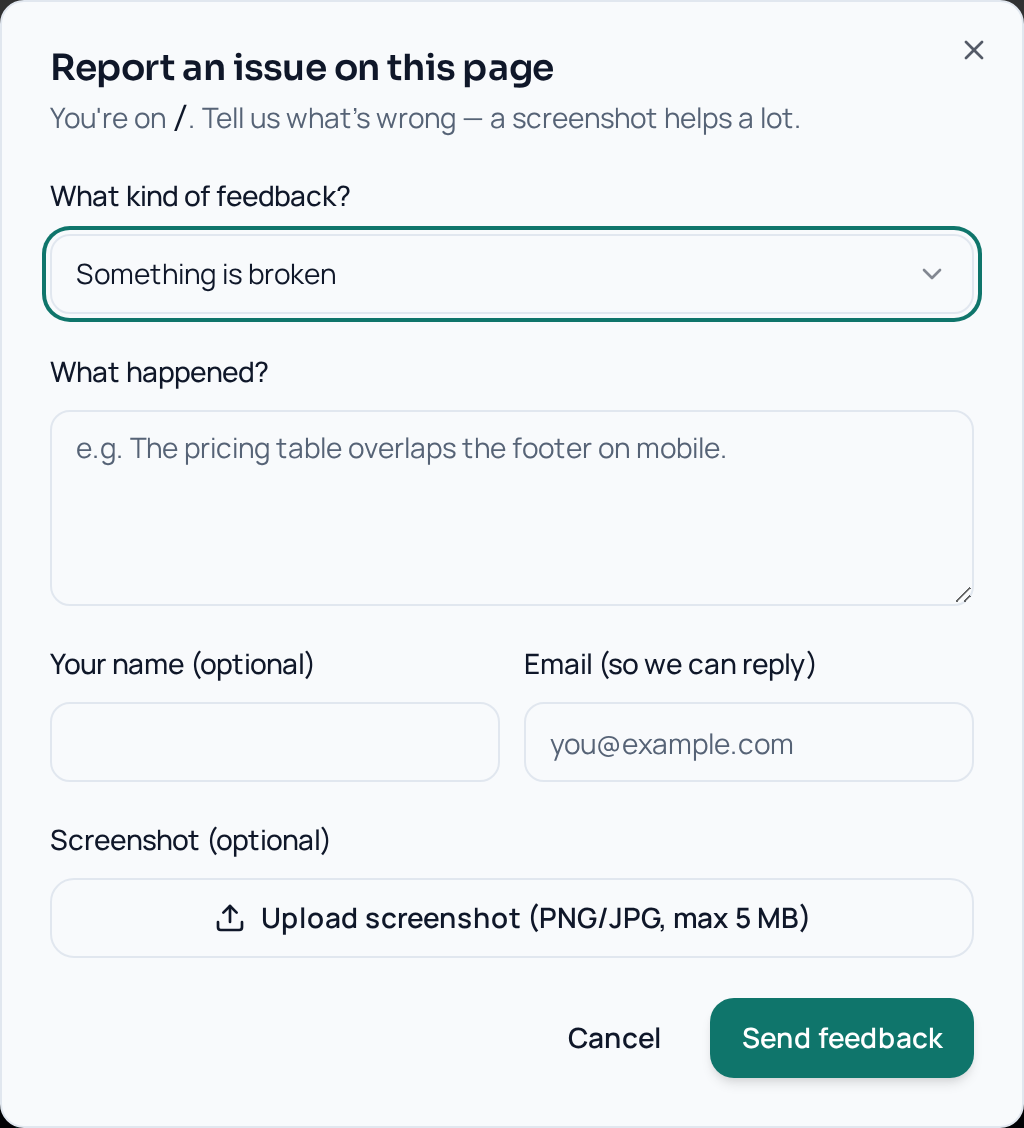
- Category — something is broken, a visual/layout bug, something confusing, a feature request, or other.
- What happened — a few sentences describing the problem. This is the only required field.
- Name and email — optional, but email is how we reply.
- Screenshot — optional PNG/JPG/WebP up to 5 MB.
How it works behind the scenes
- The widget captures the current page path and URL automatically.
- Your screenshot, if any, uploads to a private bucket that only admins can read.
- Your report is stored with your browser and viewport size, which is usually enough to reproduce layout bugs.
- It lands in the Cheaploy admin feedback inbox, where it moves through new → in progress → resolved.
- If you left an email, we contact you when we need more detail or when it ships.
How to write a report that gets fixed fast
- One issue per report. Separate reports are easier to track and close.
- Say what you expected. "I clicked Deploy and expected a build log, but the page stayed blank" beats "deploy is broken".
- Include the steps. Even three short steps make a bug reproducible.
- Attach a screenshot for anything visual. Overlapping text, cut-off buttons and contrast issues are almost impossible to fix without one.
- Report on the page where it happened so the URL is captured correctly.
- Feature requests are welcome — pick the "Feature request" category and tell us the outcome you want, not the UI you imagine.
Privacy
Redact anything sensitive before uploading a screenshot — API keys, OCI credentials, billing details. See our Privacy Policy and Data Processing Addendum for how feedback data is stored and retained.
Frequently asked
Do I need an account to send feedback?+
No. The feedback button works for signed-out visitors too. If you are signed in, we automatically attach your account so we can follow up faster.
Will you reply to me?+
Only if you leave an email address. It is optional, but without it we cannot ask follow-up questions or tell you when the issue is fixed.
What happens to my screenshot?+
Screenshots go into a private storage bucket. They are never public and can only be opened by Cheaploy administrators through short-lived signed links. Please blur or crop anything sensitive before uploading.
What gets sent along with my message?+
The page path and full URL, your message and category, your optional name and email, the screenshot if you attach one, your browser user agent and your window size. Nothing else is collected.
Is there a size limit for screenshots?+
Yes — images only (PNG, JPG or WebP) up to 5 MB. Larger files are rejected in the browser before upload.
Deploy your project for $0
No credit card. No Oracle sales call. Ship to your own cloud in under 10 minutes.
Start free